Choose a message before choosing a duration
Start with the buyer question: what does the product do, which feature deserves attention, or how do the components fit together? List the views that answer it. A rotating product view can show form, while an assembly sequence or a reviewed cutaway may explain relationships that are hidden in the complete product.
Separate visual communication from verified engineering behaviour. Identify who can approve component names, directions of motion and technical labels. If movement is not established, a static explanatory view may be a more accurate choice than invented animation.
Work through a sixty-second silent loop
| Time | Visual purpose | Review question |
|---|---|---|
| 0–8 s | Product overview and short message | Can a visitor recognize the product immediately? |
| 8–22 s | First feature or selected detail | Is the view and any movement technically approved? |
| 22–36 s | Second feature with a concise label | Does it answer a distinct buyer question? |
| 36–48 s | Assembly or context view | Can the viewer relate the details to the complete product? |
| 48–56 s | Return to the main message | Are words readable from the intended viewing position? |
| 56–60 s | Contact frame and loop return | Does the transition work when playback repeats? |
The timing is an editorial example, not a recommended duration for every booth. Remove a shot that adds no new information. If the story needs narration, prepare a readable alternative for sound-off viewing rather than squeezing a transcript onto each frame.
A real example: five views in 35 seconds
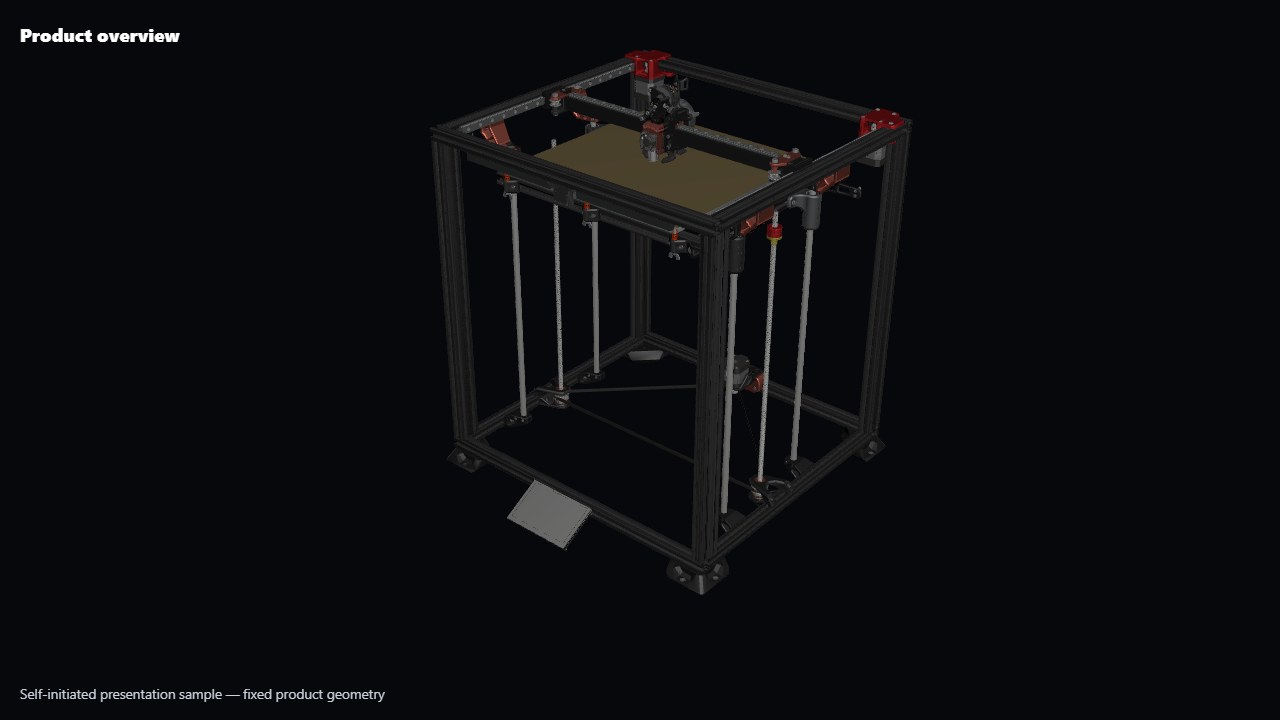
Our Fabricator sample opens with the complete printer for six seconds, moves to the controls and touchscreen, then the printhead, then the upper motion system and print bed. At 28 seconds it returns to the complete product; the sequence ends at 35 seconds.
The camera gives each area its own moment. Returning to the overview puts the close-ups back in context. That is useful for introducing the printer, but it does not explain a printing process: the product geometry stays fixed. If your buyer needs to understand a mechanism, your shot list needs the relevant movement and technical explanation as well as camera views.
Write for someone who joins halfway through
A booth visitor rarely arrives at frame one. Make each major section understandable from its opening image, then reconnect it to the complete product. Use one clear idea per shot: identify the component, reveal the relationship, or explain the outcome. Avoid requiring a viewer to remember several technical labels from an earlier scene.
Write the on-screen text alongside the storyboard. If a label needs a paragraph to explain it, split the idea into two shots or leave the deeper detail for the presenter. A silent version needs meaningful visual labels; simply removing narration from an audio-led video may remove the explanation.
List the usable source material
Provide the product configuration, CAD format and revision, approved reference images, logo assets and wording that may appear. Flag components that should be removed before public rendering. Geometry prepared for manufacturing can still require preparation for a visual sequence; explain whether reconstruction, simplified internal parts or new product views are needed.
Keep the brief separate from restricted files. Start with an enquiry describing the available material, then agree a transfer route. State rights for any music, narration or supplied third-party footage.
Give feedback that can be acted on
| Instead of | Record | Why it helps |
|---|---|---|
| “Make this clearer” | Shot 3: keep the selected component visible while its label appears | Identifies the exact communication problem. |
| “The model is wrong” | At 00:18, the housing matches revision A; replace with approved revision B | Connects the correction to a source reference. |
| “Use our brand colours” | Apply the supplied brand reference to the label panel; leave product finishes unchanged | Separates graphic treatment from product appearance. |
Collect comments into one versioned list and distinguish factual corrections from new requests. Review technical accuracy at the layout stage and visual polish at the look-development stage. Changing the story after polished shots exist can affect camera timing, labels, audio and multiple final exports.
Rehearse the final file on the actual playback setup
Confirm screen orientation, pixel dimensions, player, connection and the behaviour after power loss. Test from the expected visitor distance rather than only on an editor’s monitor. Check the first frame, smallest label, brightest background, loop boundary and audio level. If the venue changes the screen, repeat the relevant checks.
Keep an agreed master file and identify each derivative by aspect ratio and version. A portrait cut may need different composition and label placement rather than a centre crop. The Fabricator sample is a useful starting point for discussing camera presentation; its fixed geometry does not demonstrate a moving mechanism.